I wanted this project to answer a practical question: when AI makes implementation more reachable, what should a product designer be responsible for next?
For me, the answer was not simply “write more code.” It was to own more of the path between a real problem, a system model, a working product, and a launch story. With Codex as my development partner, I built and shipped a rider-driver shuttle platform for a Korean church community in Singapore.
The useful part of the story is how a small service kept forcing product decisions: which channel riders would actually use, which signals operators could trust, where a web MVP stopped being enough, and why a Driver app became necessary when rider check-ins could not represent every shuttle arrival.
I have spent much of my career designing developer experience products. My users were often engineers, platform teams, ML practitioners, or people building tools for other technical teams. So code was never far away from my design work. I was not a full-time engineer, but I naturally wrote small prototypes, read APIs, touched front-end code, and learned what changes when a screen becomes a working product.
That background made this project feel less like a jump into engineering and more like a chance to turn years of designing for builders into building practice. I had already been using tools like Cursor and Claude Code actively in my own work, and Codex first entered my workflow as another capable coding agent.
Then the project kept pulling me further. What began as a small web service became a test of something more personal: how much of the SDLC could I own myself, beyond the design phase? Could I shape a real problem, connect the server and database, move from web to iOS and Android, debug real devices, prepare store releases, and tell the launch story at the end?
Context: A Small Shuttle, A Real Product Problem
NaSum Church, also known as Korean Presbyterian Church in Singapore, is a Korean-speaking church community in Singapore. My family often used the free weekend shuttle service the church provides.
At first, it was simply something I was grateful for. Singapore is not a cheap city to move around in, so a free shuttle on a weekend morning felt generous and practical. But the more I used it, the more clearly I saw the small uncertainties around it.
Riders had to check PDFs, map links, and KakaoTalk messages to understand where to wait and whether the shuttle had already passed. If someone in the group chat posted, “the bus just passed this stop,” everyone benefited. If nobody posted, people waited with uncertainty.
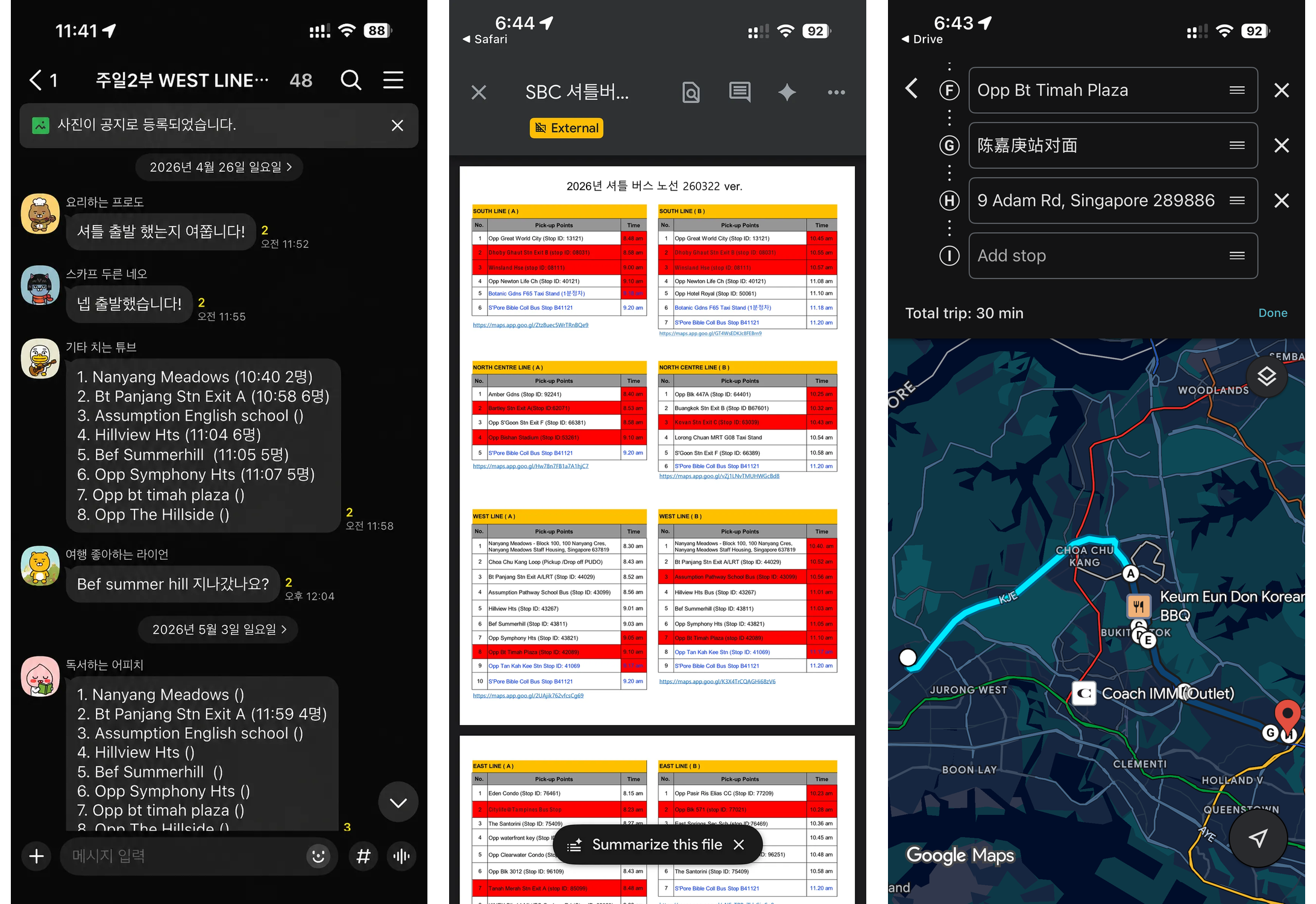
Before the product, route details and arrival signals were scattered across manual documents, map links, and KakaoTalk updates.
That was where the project started. Not from a grand product idea, but from a useful service that still depended too much on scattered manual updates.
The first thing I wanted to reduce was uncertainty.
For riders, the uncertainty was simple:
- Where should I wait?
- Which route should I take?
- Has the shuttle already passed?
- Did anyone else board from this stop?
For operators, the uncertainty was different:
- Which stops are actually being used?
- How many people boarded?
- Where is demand increasing or disappearing?
- How much coordination still depends on chat?
The product I decided to build was a small operating service where riders and operators could look at the same signals. Riders could check routes and stops, board with QR check-in, and receive updates. Operators could manage routes, stops, boarding records, and notifications in one place.
The goal was to make the shuttle feel more high-tech to make a generous, volunteer-driven service easier to use and easier to operate.
For me, the shuttle also became the right kind of side project: small enough to build alone, but real enough to be honest. It had actual users, operational constraints, cost limits, platform decisions, and enough complexity to test whether I could move beyond design handoff and act more like a product builder.
Build 1: Start With A Small Web MVP
Small Web MVP
At the beginning, I was not trying to build a full native app suite.
I wanted to make a small web MVP first: something narrow enough to build quickly, but real enough to test whether route lookup, QR check-in, admin updates, and notifications could work as one service flow.
Plan Mode
I also did not begin by asking Codex to “build the whole thing.”
The first discipline was to make the work small enough to verify. Before implementation, I used Codex to shape the plan: who the service was for, which flows mattered in the first version, which parts were intentionally out of scope, what data needed to exist, and what signal would prove that each step worked.
That planning mattered more than any single prompt. I wanted each task to have a clear input, output, and check:
- Define the smallest useful flow.
- Turn that flow into an
API contract. - Build one route or screen at a time.
- Run it locally.
- Check the screen, console, and network request.
- Reduce any failure into the next small task.
The fastest way to run the first small SDLC cycle was to start on the web. I used Next.js for the web and API routes, Neon Postgres for the database, Prisma for the data layer, Vercel for deployment, and LINE LIFF as the first entry point.
LINE was not the obvious long-term choice for this user group. In Singapore, WhatsApp is more common. Among Korean users, KakaoTalk is much more familiar. But for the first version, LINE LIFF gave me a practical way to connect login, user context, web entry, QR check-in, links, and messaging without asking people to install a full app on day one.
That mattered because this was not a commercial project with a large operating budget. I wanted the service to stay almost free to run. LINE Messaging API, Vercel, Neon, and the rest of the early stack let me validate the idea without turning a church shuttle into a cost problem.
The first working loop was intentionally small. Riders could see routes and stops. QR check-in created a boarding record. Operators could manage the basic shuttle data. Notifications could connect the flow.
I treated each feature less like a big milestone and more like a closed verification loop. A route lookup was not done when the UI existed; it was done when the route data came from the API, appeared correctly on the screen, and failed in an understandable way. QR check-in was not done when the scanner opened; it was done when the boarding record reached the database and the result screen had the right context.
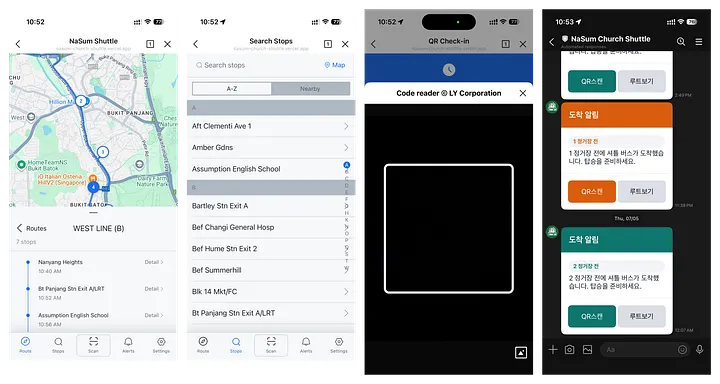
The first web MVP kept the Rider flow intentionally small: route lookup, stop detail, QR check-in, and basic operational updates.
Swagger As Blueprint
The important artifact at this stage was not just the UI. It was the API contract.
Once routes, stops, users, check-ins, and notifications were expressed as API behavior, the product became easier to move across surfaces. The web app was no longer only an early interface. It became a working blueprint.
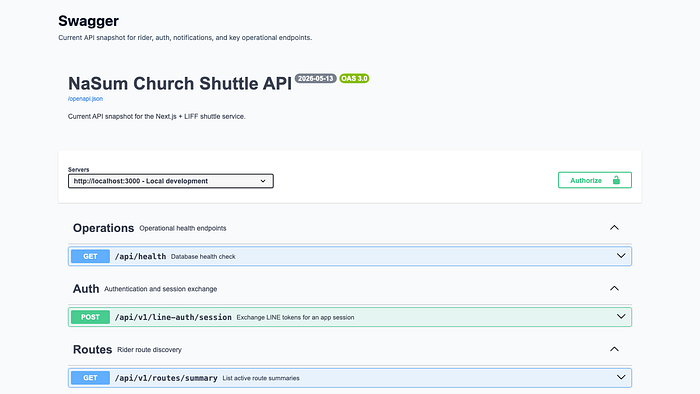
Swagger became the shared contract for routes, stops, users, check-ins, notifications, and the clients that would later consume them.
This is where Codex started to feel especially useful. I was not asking it to invent a product from a blank page. I could give it a plan, ask it to break down a small task, implement one route, connect one screen, run one check, and then move to the next piece. The work became less like one giant prompt and more like a steady product-building rhythm.
Ask for a small step. Run it. Inspect the signal. Reduce the failure. Ask again.
That rhythm was slower than a fantasy version of AI coding, but it was much more reliable.
Feedback 1: The Flow Worked, The Channel Did Not
The web version did what I needed it to do. It proved that the product flow made sense.
It also gave me something more useful than a static spec. The web app carried the information architecture, API behavior, state transitions, and edge cases. It became the first working version of the product system, not just a clickable idea.
But it also surfaced the problem I had expected.
When I showed it to people, the service felt useful, but the channel questions came up quickly: “Is there a KakaoTalk version?” “Can this work through WhatsApp?” “Is there just an app I can open?” A service trapped inside one messenger was not the most natural form.
The first delivery had validated the product flow, but it also confirmed the next problem: access and platform fit.
Build 2: Translate The Rider Experience To Native
So I moved the Rider experience into native iOS and Android apps.
This was not just a cosmetic upgrade. The web MVP had already proved the core flow: login, route lookup, stop detail, QR check-in, admin updates, API responses, and basic error handling. That made it a practical blueprint for the apps, but not something I wanted to copy screen by screen.
This also mattered to me as a designer. I had wanted to test new native design languages more seriously, but it is hard to find a real playground for them. Apple’s Liquid Glass direction and Android’s Material 3 Expressive are easy to admire in demos; they are much harder to understand inside an actual product flow with maps, permissions, motion, errors, and repeat use.
The real work was platform translation. I wanted those design languages to become product language, not decoration. So the question became: how should the same shuttle model behave if it truly belonged on each platform?
So I went back to Plan Mode before building each client. I asked Codex to help break down platform decisions: when to request push permission, how deep links should recover from failure, how route and stop information should sit on top of the map, and which native components should carry lists, cards, bottom sheets, toasts, and empty states.
For iOS, I used SwiftUI, the Google Maps SDK, push notifications, and deep links. The experience leaned into a map-first structure, with floating sheets and glass-like surfaces layered over the route context so riders could move between route browsing, stop detail, and check-in without leaving the map.
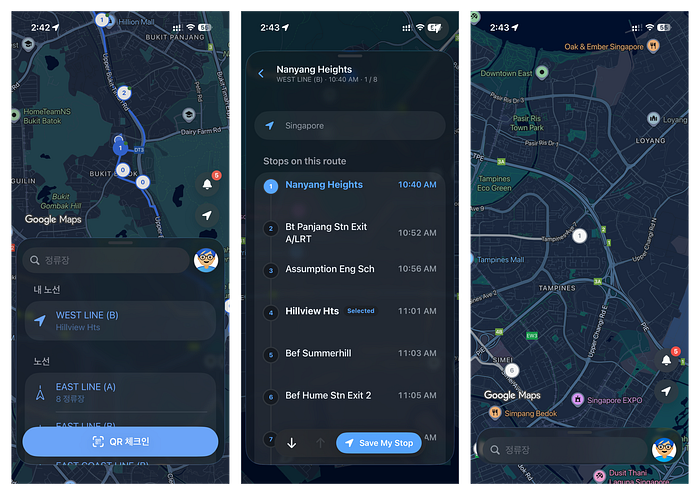
The iOS Rider app translated the validated web flow into SwiftUI, Google Maps SDK, push, deep links, and Liquid Glass-inspired native screens.
For Android, I used Kotlin, Jetpack Compose, Material 3 Expressive, Google Maps Compose, Firebase, and FCM. The Android version kept the same functional model, but reorganized it around Android patterns: top app bars, search, bottom navigation, Compose surfaces, and a small test of Material’s more expressive motion and interactions.
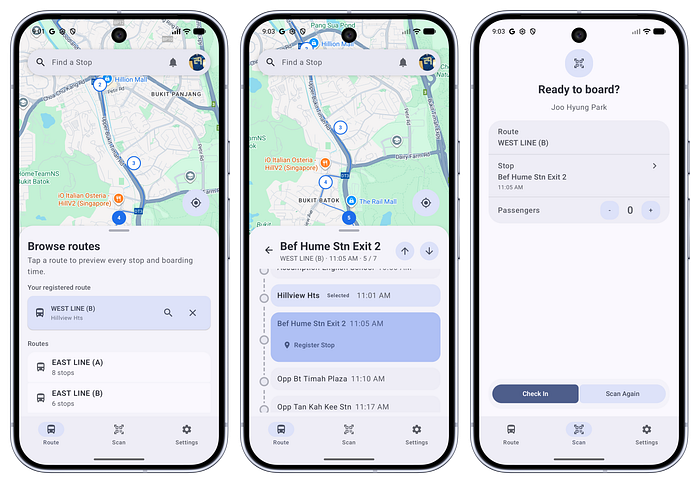
The Android Rider app kept the same product flow while rebuilding it with Jetpack Compose, Material 3 Expressive, Google Maps Compose, Firebase, and FCM.
Real Device Validation
This step taught me something I now trust more deeply: a working web product can be more useful than a static spec when building with Codex.
When I moved into iOS and Android, I was not asking Codex to guess what the product should be. I was asking it to translate a system that already worked.
That changed the quality of the collaboration.
The Rider apps also made the product easier to show and test. The service no longer felt like a web flow hidden inside a messenger. It felt like something riders could install, open, and return to when they needed shuttle information.
A quick look at the Rider and Driver app experience I built for the shuttle platform.
That was exactly why the next gap became easier to see.
Feedback 2: The Rider App Could Not Create Every Signal
Once route lookup and QR check-in worked as an app experience, I started looking at check-in data not only as a boarding record but also as a possible arrival signal. If someone scanned a QR code at a stop, the shuttle must have reached that stop. In theory, that event could help other riders understand where the bus was.
The idea was reasonable, but it was still too dependent on riders creating the event.
A church member who had helped with shuttle operations for a long time pointed out the missing case.
On some weekends, especially during holidays or school breaks, ridership changes a lot. Some stops may have no riders at all. A stop with no rider creates no QR check-in. No QR check-in means no event. And if the system receives no event, the Rider app cannot confidently say whether the shuttle passed that stop.
That was the moment the product model changed.
QR check-in was useful as a boarding signal. It was not enough as an arrival signal.
So the question shifted from How do we make riders check in? to How does the shuttle itself become the trusted signal source?
Build 3: Make The Shuttle The Source Of Truth
The answer was a separate Driver app. I did not want Rider apps to carry unnecessary background location responsibility, and I did not want the operation to depend on riders creating every event. The shuttle itself needed to publish the signal.
That changed the product from a Rider app into a Rider-Driver platform. The Driver app sends location and route status. The server updates the active run. The Rider app reflects that movement through maps, stop status, and notifications. QR check-in still records actual boarding, but it no longer has to pretend to be the only source of truth.
On the surface, this sounds like moving a bus marker on a map. In reality, it meant designing one connected platform experience across the Driver app, server, and Rider app. Location upload, route state, stop progression, Rider map updates, and notification timing all had to agree.
Work Mode: Keeping The Build Loop Alive From A Hospital Room
That would have been a complicated enough iteration from my usual desk. But this was also the moment when life made the work stranger.
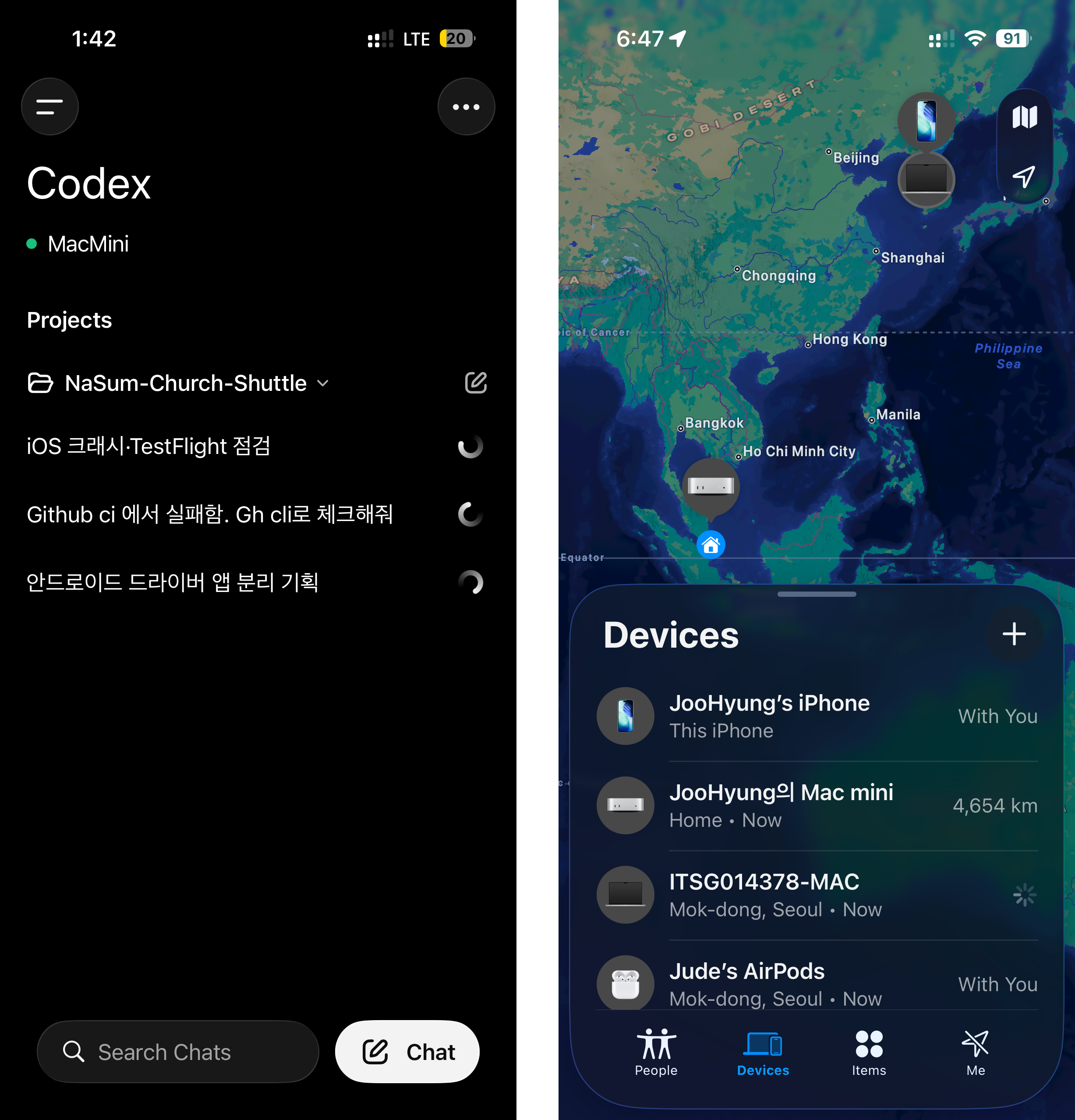
From Korea, I used Codex mobile to control the project running on my Mac mini in Singapore and continue the Driver app work inside the real repository.
I was in Korea, spending long hours in a hospital room while helping care for my father. My development environment was still on a Mac mini in Singapore, about 4,700 km away. Normally, I would keep the Rider app, Driver app, server logs, simulators, and browser windows open side by side. In the hospital room, I mostly had my phone.
The situation was not planned as a mobile coding experiment. The problem simply arrived at an inconvenient time, and the product did not feel like it should wait.
So ChatGPT mobile became my control room. The phone was not the development machine. Codex worked in the remote Mac mini environment, inside the actual repository. I reviewed progress from my phone, spoke tasks into the mobile app, checked summaries and screenshots, and kept the product loop moving from the hospital room.
OpenAI’s Codex mobile preview gives context for the mobile workflow I used during this phase.
What surprised me was that typing code was not the hard part. I barely needed to type. I could speak the task, and Codex could turn that spoken intent into a task list, file reads, code changes, logs, and verification steps because it already had the repository context. It felt less like explaining an idea to a stranger and more like handing work to a teammate who was already looking at the same repo.
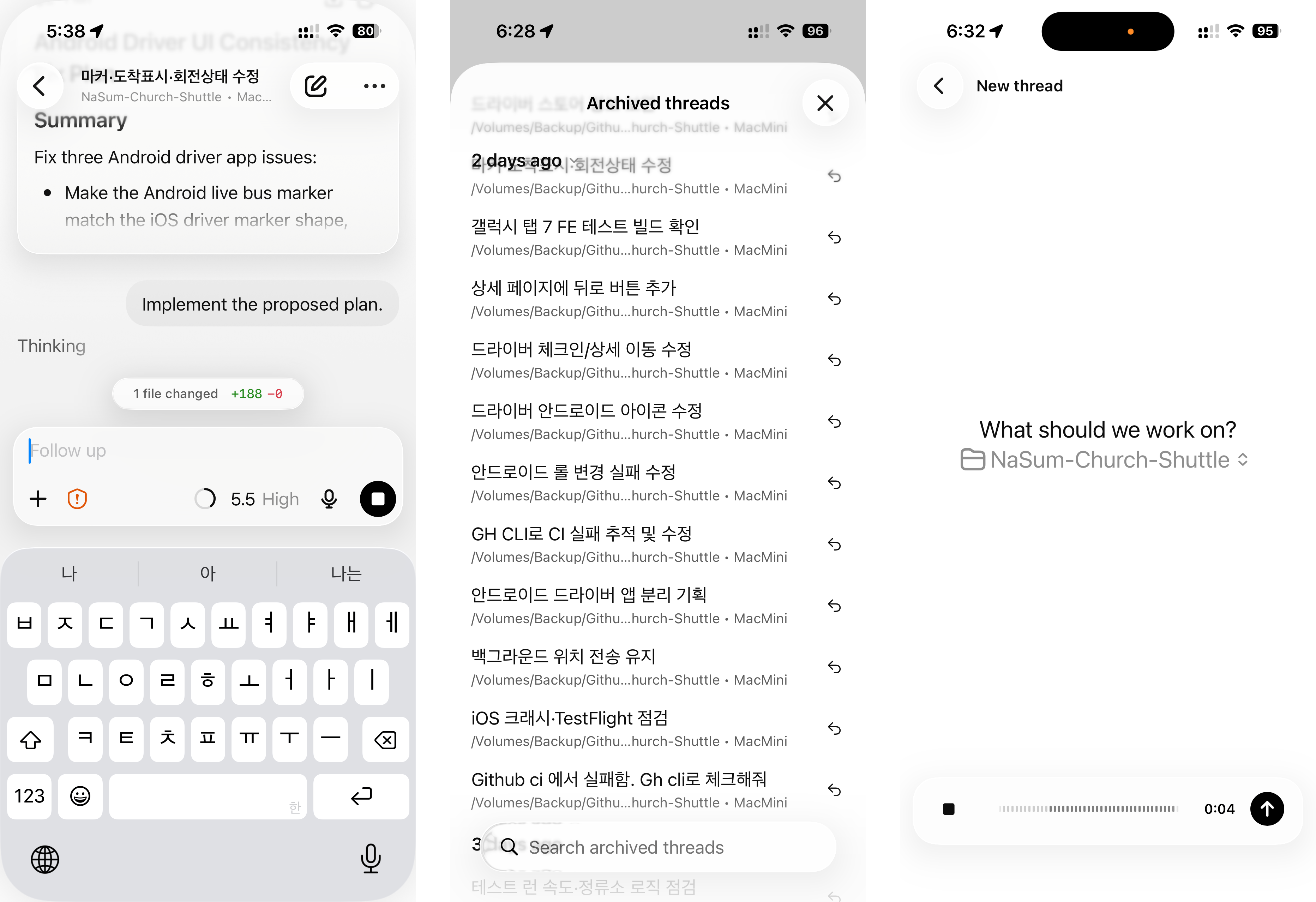
Voice input worked because Codex already had repository context: a spoken task could become a thread, a work plan, and concrete code changes.
The harder part was the feedback loop.
On desktop, I can build, inspect, compare, and respond quickly. On mobile, I could not comfortably keep multiple apps, simulator windows, logs, and screenshots in front of me. That forced the workflow to change. I had to ask Codex not only to implement, but also to read logs, summarize what failed, propose the next smallest fix, and verify the result before moving forward.
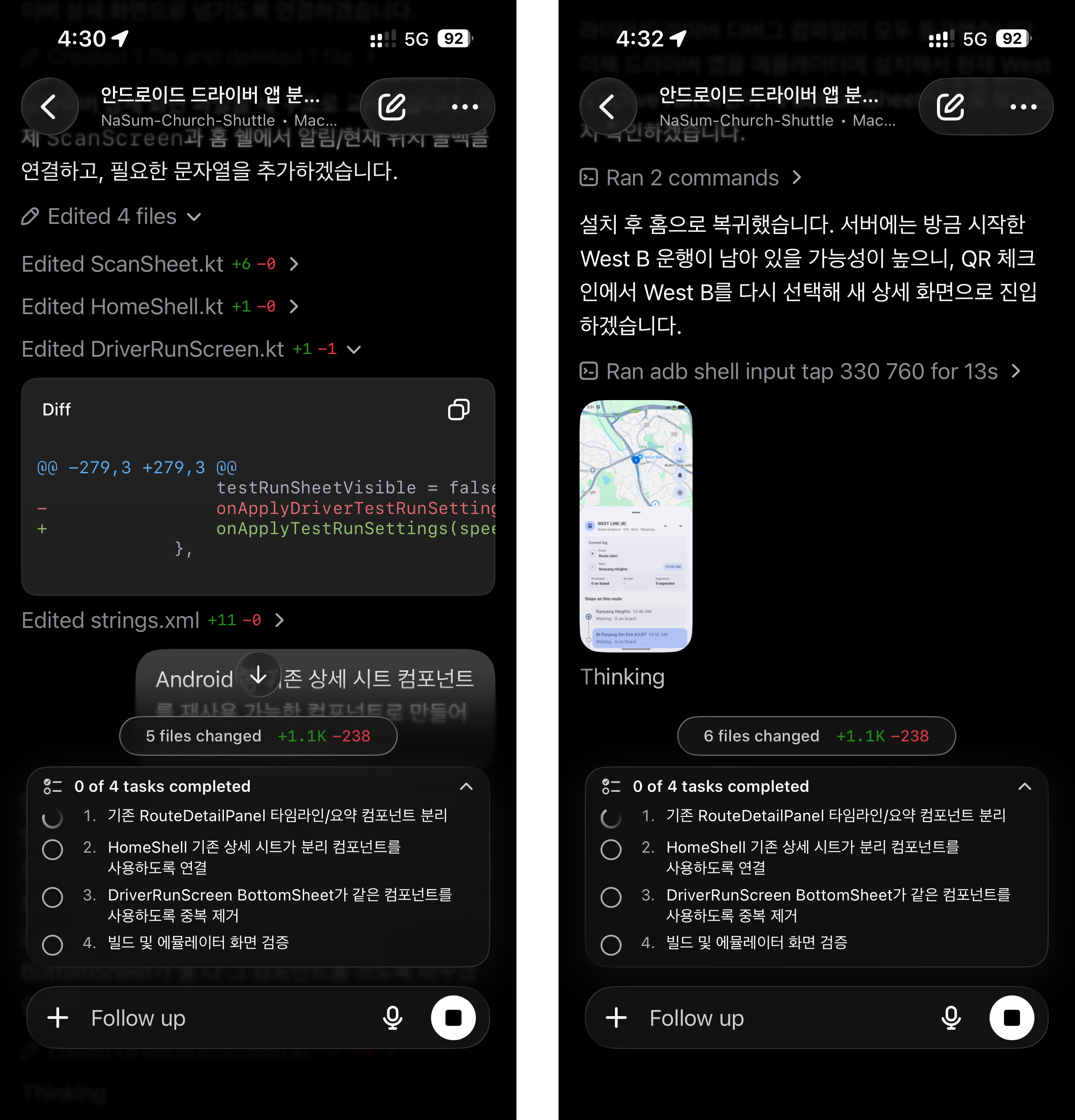
The mobile workflow worked when each task had visible success criteria, a summarized failure, and a clear next smallest fix.
This is where the Driver app and the mobile workflow started shaping each other.
The verification problem became a product problem. I could not wait for a real shuttle ride every time I needed to test the flow, so the Driver app needed a test-drive mode. Codex first suggested this as a way to repeatedly simulate a run, and the idea quickly became essential. The first version was unstable, but that instability was useful: it showed exactly where the location upload, Rider map reflection, and stop status logic needed to improve.
An early Driver app test run showed how simulated movement could help verify background location, server sync, and Rider map updates.
The final Driver app flow made arrival tracking a dedicated driver-side responsibility instead of depending on rider check-ins.
This is the part of the project I am most proud of. Not because the UI became more polished, but because the product became more honest. I found a structural gap and changed the architecture around it.
The lesson was not “now I can code from a phone.”
It was that a product builder can keep momentum in imperfect conditions if the work is broken down clearly enough and the validation loop is visible enough. Codex mobile did not replace the desk; it helped me keep the product loop alive when I could not sit at one.
Builder Takeaway: Owning More Of The SDLC
This project was never about asking AI to build an app for me.
Codex helped across almost every stage: planning, API contracts, server routes, client implementation, debugging, logs, platform work, and release preparation.
But the product judgment stayed with me.
The screen got smaller, but the workflow did not: Driver app work, validation, and launch preparation continued through a mobile-controlled Codex loop.
I still had to decide what problem mattered, what could wait, which platform choice was practical, whether the current hypothesis was wrong, and what signal would prove the next step. Codex made the scope reachable, but it did not remove the need to think like a product builder.
That was the difference between using Codex for code generation and using it to own more of the SDLC while keeping product judgment in my hands.
The most useful habit was turning vague failure into a smaller sentence. Not “the app is broken,” but “the QR scanner opens but the check-in result screen does not receive the route ID.” Once the failure became small enough, Codex became much more effective.
By the end, the project had grown into a real multi-surface system: server, database, web/admin, native Rider apps, native Driver apps, maps, QR check-in, location updates, notifications, analytics, crash reporting, store preparation, and a promotional video.
Live Rider app
NaSum Shuttle Check-In is available on iOS and Android for route lookup, QR check-in, and stop updates.


Live Driver app
NaSum Shuttle Driver is available on iOS and Android for authorized shuttle drivers and operators.
That is the part I want this project to show: I can design the experience, understand the system underneath it, and keep moving until the product is real enough to test, ship, and explain.
Reflection: What Stayed With Me
This project changed my sense of what a product designer can practice.
I still do not think every designer needs to become a traditional full-stack engineer. That is not the point. The point is that AI makes it more realistic for a technically curious designer to own more of the SDLC without pretending to be a full-time engineer: from problem framing to system modeling, implementation, release, and launch storytelling.
But owning more of the SDLC requires more than prompting.
It requires knowing how a product problem becomes a system model. It requires understanding API contracts, data flows, platform constraints, real-device behavior, store requirements, analytics signals, and crash logs well enough to ask better questions.
Most of all, it requires product judgment.
Codex expanded my reach, but it did not decide what mattered. It did not tell me that a messenger-based web app was useful for validation but not enough for long-term access. It did not feel the missing event at empty stops until the real operation revealed it. It did not care whether the launch story was understandable to riders.
Those were product decisions.
What Codex changed was the distance between deciding and trying. That distance used to feel long enough that many ideas stopped at a screen, a prototype, or a handoff. In this project, it became short enough for me to keep moving: from a weekend shuttle problem, to a web flow, to native Rider apps, to a Driver app, to store preparation, to a promotional video.
This was a side project, but it felt like a shift in how I want to build.
Not just designing the ideal flow. Not just handing off screens. Not just asking AI to generate code.
Finding a real problem, making the first useful version, seeing where the model breaks, and moving quickly enough to make the product truer.
That is how far I wanted to see if I could go with Codex. Now I know I can go further than I expected.
References
- NaSum Church: Korean Presbyterian Church in Singapore
- Original Korean post: Product designer with Codex
- Original Korean post: Mobile voice coding with Codex
- Planning sample: Gist